CSS伪元素与Content属性的详细区分(代码示例)
时间:2024/2/21作者:未知来源:争怎路由网人气:
- globalCounters.__temp[name] } function applyCSS(mount){ const clz = mount.className if (clz == "dl"){ resetCounter("dt", 0) const children = mount.children for (let i = 0; i < children.length; ++i){ applyCSS(children[i]) } } else if (clz == "dt"){ resetCounter("dd", 0) incrementCounter("dt", 1) const elAsBefore = document.createElement("span") elAsBefore.textContent = counter("dt", "lower-roman") + " " mount.insertBefore(mount.firstChild) } else if (clz == "dd"){ incrementCounter("dd", 1) const elAsBefore = document.createElement("span") elAsBefore.textContent = counter("dd", "lower-roman") + " " mount.insertBefore(mount.firstChild) } }
嵌套计数器
?对于多层嵌套计数器我们可以使用counters(<identifier>, <separator>, <list-style-type>?)
.ol .li .ol .li{a} .li{b} .li .ol .li{c}.ol { counter-reset: ol; & .li::before { counter-increment: ol; content: counters(ol, "."); } }Content的限制
IE8+才支持Content属性;
除了Opera9.5+中所有元素均支持外,其他浏览器仅能用于:before,:after内使用;
无法通过JS获取Counter和Counters的运算结果。得到的就只能是"counter(mycouonter) \" \""。
自定义引号
?引号这个平时很少在意的符号,其实在不同的文化中使用的引号将不尽相同,如简体中文地区使用的"",而日本则使用「」。那我们根据需求自定义引号呢?答案是肯定的。
?通过open-quote,close-quote,no-open-quote和no-close-quote即可实现,下面我们通过例子来理解。
?<q>会根据父元素的lang属性自动创建::before和::after来实现插入quotation marks。p[lang=en]>q{英语} p[lang=no]>q{挪威语} p[lang=zh]>q{汉语} p[lang=en]>q.no-quote{英语2} div[lang=no]>.quote{挪威语2}CSS片段:
p[lang=en] > q{ quotes: "<!--" "-->"; /* 定义引号 */ } p[lang=en] > q.no-quote::before{ content: no-open-quote; /*或者 content: none;*/ } div[lang=no] > .quote { quotes: "<<-" "->>"; } div[lang=no] > .quote::before { content: open-quote; } div[lang=no] > .quote::after { content: close-quote; }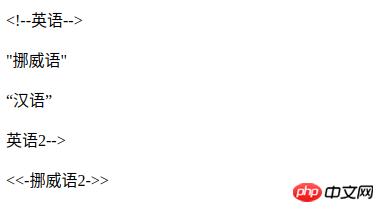
示例
分割线
p.sep{or}.sep { position: relative; text-align: center; &::before, &::after { content: ""; box-sizing: border-box; height: 1px; width: 50%; border-left: 3em solid transparent; border-right: 3em solid transparent; position: absolute; top: 50%; } &::before { left: 0; } &::after { right: 0; } }只读效果(通过遮罩原来的元素实现)
.input-group { position: relative; &.readonly::before { content: ""; position: absolute; width: 100%; height: 100%; top: 0; left: 0; } }计数器
.selections>input[type=checkbox]{option1}+input[type=checkbox]{option2} .selection-count.selections{ counter-reset: selection-count; & input:checked { counter-increment: selection-count; } } .selection-count::before { content: counter(selection-count); }以上就是CSS伪元素和Content属性的详细分析(代码示例)的详细内容,更多请关注php中文网其它相关文章!
网站建设是一个广义的术语,涵盖了许多不同的技能和学科中所使用的生产和维护的网站。
关键词:CSS伪元素与Content属性的详细区分(代码示例)