纯CSS完成表头固定的代码示例
时间:2022-11-8作者:未知来源:争怎路由网人气:
- ="en"]{ <br/>color:green}</td> </tr> <tr> <td>反选属性值选择器</td> <td>[attr!="value"] </td> <td>非标准,jQuery中出现的</td> <td>span[class!="red"]{<br/>color:green}</td> </tr> </tbody> </table> </p> </p> </body> </html>
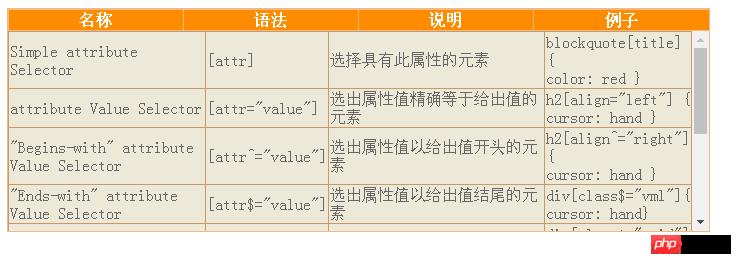
发现表头的格子与表身的格子不对齐。这时我们需要动用col标签,col允许我们统一设置tbody中索引值与它相同的td或th的背景色,文字对齐方式与宽度。虽然CSS2.1的相邻选择器与CSS3的子元素过滤伪类能让我们用更精简的方式设置它们,而且是样式与结构分离那种,可惜IE家族总是拖后腿。我们再看一下它们的长度,由于最后一个表格有可能受滚动条挤压而缩短长度,我们保证前三列长度相等就行了,剩余的都分配给最后一个,换言之,最后一个不用设置。另,IE下可以设置滚动条的样式,我们也把玩一翻吧。
<table class="thead"> <col width="170px"></col> <col width="170px"></col> <col width="170px"></col><col></col> <tbody> //********************略***************** </tbody> </table> <p> <table class="tbody"> <col width="170px"></col> <col width="170px"></col> <col width="170px"></col><col></col> <tbody> //********************略***************** </tbody> </table> </p>表现层部分:
#scrollTable { width:701px; border: 1px solid #EB8;/*table没有外围的border,只有内部的td或th有border*/ background: #FF8C00; } #scrollTable table { border-collapse:collapse; /*统一设置两个table为细线表格*/ } /*表头 p的第一个子元素**/ #scrollTable table.thead{ width:100%; } /*表头*/ #scrollTable table.thead th{ border: 1px solid #EB8; border-right:#C96; color:#fff; background: #FF8C00;/*亮桔黄色*/ } /*能带滚动条的表身*/ /*p的第二个子元素*/ #scrollTable p{ width:100%; height:200px; overflow:auto;/*必需*/ scrollbar-face-color:#EB8;/*那三个小矩形的背景色*/ scrollbar-base-color:#ece9d8;/*那三个小矩形的前景色*/ scrollbar-arrow-color:#FF8C00;/*上下按钮里三角箭头的颜色*/ scrollbar-track-color:#ece9d8;/*滚动条的那个活动块所在的矩形的背景色*/ scrollbar-highlight-color:#800040;/*那三个小矩形左上padding的颜色*/ scrollbar-shadow-color:#800040;/*那三个小矩形右下padding的颜色*/ scrollbar-3dlight-color: #EB8;/*那三个小矩形左上border的颜色*/ scrollbar-darkshadow-Color:#EB8;/*那三个小矩形右下border的颜色*/ } /*能带滚动条的表身的正体*/ #scrollTable table.tbody{ width:100%; border: 1px solid #C96; border-right:#B74; color:#666666; background: #ECE9D8; } /*能带滚动条的表身的格子*/ #scrollTable table.tbody td{ border:1px solid #C96; }运行代码:
<!doctype html> <html dir="ltr" lang="zh-CN"> <head> <meta charset="utf-8"/> <title>纯CSS实现表头固定 </title> <style type="text/css"> #scrollTable { width:701px; border: 1px solid #EB8;/*table没有外围的border,只有内部的td或th有border*/ background: #FF8C00; } #scrollTable table { border-collapse:collapse; /*统一设置两个table为细线表格*/ } /*表头 p的第一个子元素**/ #scrollTable table.thead{ width:100%; } /*表头*/ #scrollTable table.thead th{ border: 1px solid #EB8; border-right:#C96; color:#fff; background: #FF8C00;/*亮桔黄色*/ } /*能带滚动条的表身*/ /*p的第二个子元素*/ #scrollTable p{ width:100%; height:200px; overflow:auto;/*必需*/ scrollbar-face-color:#EB8;/*那三个小矩形的背景色*/ scrollbar-base-color:#ece9d8;/*那三个小矩形的前景色*/ scrollbar-arrow-color:#FF8C00;/*上下按钮里三角箭头的颜色*/ scrollbar-track-color:#ece9d8;/*滚动条的那个活动块所在的矩形的背景色*/ scrollbar-highlight-color:#800040;/*那三个小矩形左上padding的颜色*/ scrollbar-shadow-color:#800040;/*那三个小矩形右下padding的颜色*/ scrollbar-3dlight-color: #EB8;/*那三个小矩形左上border的颜色*/ scrollbar-darkshadow-Color:#EB8;/*那三个小矩形右下border的颜色*/ } /*能带滚动条的表身的正体*/ #scrollTable table.tbody{ width:100%; border: 1px solid #C96; border-right:#B74; color:#666666; background: #ECE9D8; } /*能带滚动条的表身的格子*/ #scrollTable table.tbody td{ border:1px solid #C96; } </style> </head> <body> <p id="scrollTable"> <table class="thead"> <col width="170px"></col> <col width="170px"></col> <col width="170px"></col><col></col> <tbody> <tr> <th>名称</th> <th>语法</th> <th>说明</th> <th>例子</th> </tr> </tbody> </table> <p> <table class="tbody"> <col width="170px"></col> <col width="170px"></col> <col width="170px"></col><col></col> <tbody> <tr> <td>Simple attribute Selector</td> <td>[attr] </td> <td>选择具有此属性的元素</td> <td>blockquote[title] { <br/>color: red }</td> </tr> <tr> <td>attribute Value Selector</td> <td>[attr="value"] </td> <td>选出属性值精确等于给出值的元素</td> <td>h2[align="left"] { <br/>cursor: hand } </td> </tr> <tr> <td>"Begins-with" attribute Value Selector</td> <td>[attr^="value"] </td> <td>选出属性值以给出值开头的元素</td> <td>h2[align^="right"] { <br/>cursor: hand } </td> </tr> <tr> <td>"Ends-with" attribute Value Selector</td> <td>[attr$="value"] </td> <td>选出属性值以给出值结尾的元素</td> <td>p[class$="vml"]{<br/>cursor: hand} </td> </tr> <tr> <td>Substring-match attribute Value Selector</td> <td>[attr*="value"] </td> <td>选出属性值包含给出值的元素</td> <td>p[class*="grid"]{<br/> float:left} </td> </tr> <tr> <td>One-Of-Many Attribute Value Selector</td> <td>[attr~="value"] </td> <td>原元素的属性值为多个单词,给出值为其中一个。</td> <td>li[class~="last"]{<br/> padding-left:2em} </td> </tr> <tr> <td>Hyphen Attribute Value Selector</td> <td>[attr关键词:纯CSS完成表头固定的代码示例